
Your Phone Number is the Key to Your Digital Life: How to Stop SIM Swap Attacks
Imagine picking up your smartphone to send a text to a grandchild or check the weather, only to find you have "No Service." You assume it’s a network glitch, but hours pass, and it doesn’t come back. Meanwhile, a hacker miles away has just activated your phone number on their device.
This is called a SIM Swap, and it is becoming one of the most concerning scams targeting seniors today.
At AnewVista, we believe that knowledge is power. While headlines about "phantom hackers" and data breaches can be frightening, the solution to this specific problem is actually quite simple and empowering. Here is what you need to know to lock the front door of your digital life.
What is a SIM Swap?
A SIM card is the tiny chip in your phone that connects you to your network. It tells the cell tower, "I am [Your Name], and this is my number."
In a SIM swap scam, a criminal calls your mobile phone carrier (like Verizon, AT&T, or T-Mobile) pretending to be you. They might say, "I bought a new phone and need to transfer my number to this new SIM card."
If they are successful, your phone goes dead. Your number—and all the calls and texts sent to it, now go to the criminal’s phone instead.

Why This Matters: Losing Control of Digital Assets
You might think, "So what? I’ll just call the phone company and fix it." But in the hour (sometimes days), it takes to fix, the damage can be done.
The danger isn't just about the phone calls; it is about Two-Factor Authentication (2FA).
Think about when you log into your bank account or email. often, the website will say: "We sent a code to your phone to prove it's really you." If a hacker has stolen your phone number via a SIM swap, they get that code.
Once they have your number, they can use the "Forgot Password" feature on your email, bank, and social media accounts to lock you out. It is a rapid loss of control over your digital assets.
The Solution: The "Verbal Password" and Port Freeze
The good news is that you can stop this before it happens. You need to put a lock on your account that requires a special key to open.
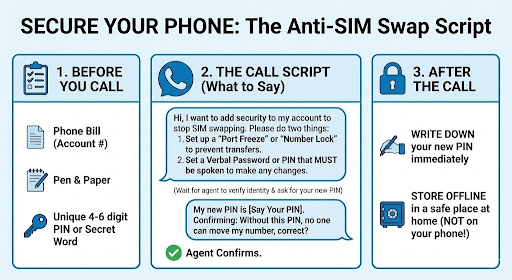
The easiest safeguard is to contact your phone carrier and request a Verbal Password or PIN on your account.
Action Steps for You:
Call 611 from your mobile phone (or your carrier's customer service number).
Tell the representative: "I want to add extra security to my account to prevent unauthorized SIM swaps or number transfers."
Ask for a "Port Freeze," "Number Lock," or "Transfer PIN." Different carriers use different names, but they all mean the same thing: No one can move your number to a new phone without this specific code.
Set a Verbal Password. Ask to add a specific verbal password (a word or phrase) that must be spoken to a representative before they can discuss your account details or make changes.
Important: Do not use your birthday, the last four digits of your Social Security number, or your mother's maiden name. Hackers can find this information in data breaches. Pick a random MEMORABLE word or phrase, like "Purple Cactus" or "Midnight Train." Be sure to document the pin/password in a safe place.
A Note on "Phantom Hackers"
You may have read news about "phantom hacker" scams targeting seniors. These often start with a pop-up on your computer or a text message telling you your accounts are "compromised."
Please remember: Real tech support will never call you demanding you move money. If you are ever unsure, hang up and call AnewVista, or come to one of our office hours. We are here to help you verify what is real and what is a scam.
Summary Checklist:
[ ] Call your mobile carrier today.
[ ] Set up a PIN/Passcode specifically for account changes.
[ ] Write this PIN down and store it in a safe place at home (not on your phone!).
[ ] Breathe easier knowing you have taken a massive step in protecting your independence.
Technology should help you live a fulfilling, independent life, not make you worry. By taking this one simple step, you ensure that your phone remains yours.
Empowering Seniors in the Digital Age AnewVista Community Services is a 501(c)(3) non-profit organization focused on helping you navigate technology with confidence.
ANVCS.org Increased Digital Literacy | Improved Health Outcomes | Enhanced Social Connection
Stay Connected and Informed with ANVCS.org
Need Help with Tech?
AnewVista offers a variety of FREE technology classes/talks and one-on-one support to help seniors master their devices. Contact us today to learn more.
Check out our upcoming classes at anvcs.org/classes.
Your Guide to Digital Confidence
Join our Free Tech classes/talks and workshops at AnewVista Community Services at www.anvcs.org
Facebook at: https://www.facebook.com/AnewVista/
Instagram @anewvistacs
Podcasts now on Spotify & Apple Podcasts – Search ANVCS
We're dedicated to empowering seniors to thrive in the digital world. Visit our website or call us today!
For more technology tips for seniors, visit us at www.anvcs.org or send an email to info@anvcs.org where we make learning easy.
Comments